When you establish a WebSocket connection with NavTalk, the server sends various event messages throughout the conversation lifecycle. This page provides an overview of all available event types and their flow.

Event Categories

WebSocket events are categorized into seven main types:

Connection Events

WebSocket connection lifecycle events (3 events)

Session Events

Session lifecycle events (2 events)

WebRTC Signaling Events

WebRTC signaling exchange (3 events)

Input Events

User speech detection, transcription, and image input (4 events)

Response Events

AI response generation and streaming (4 events)

Function Call Events

External function execution

Error Events

Error notifications and status alerts (4 events)

Real-time Session

A real-time session is a stateful interaction between the model and the connected client. The key components of a session are:
  • Session Object: Controls the parameters of the interaction, such as the model being used, the voice used to generate output, and other configurations.
  • Conversation: Represents user input items and model output items generated during the current session.
  • Response: Audio or text items generated by the model that are added to the conversation.
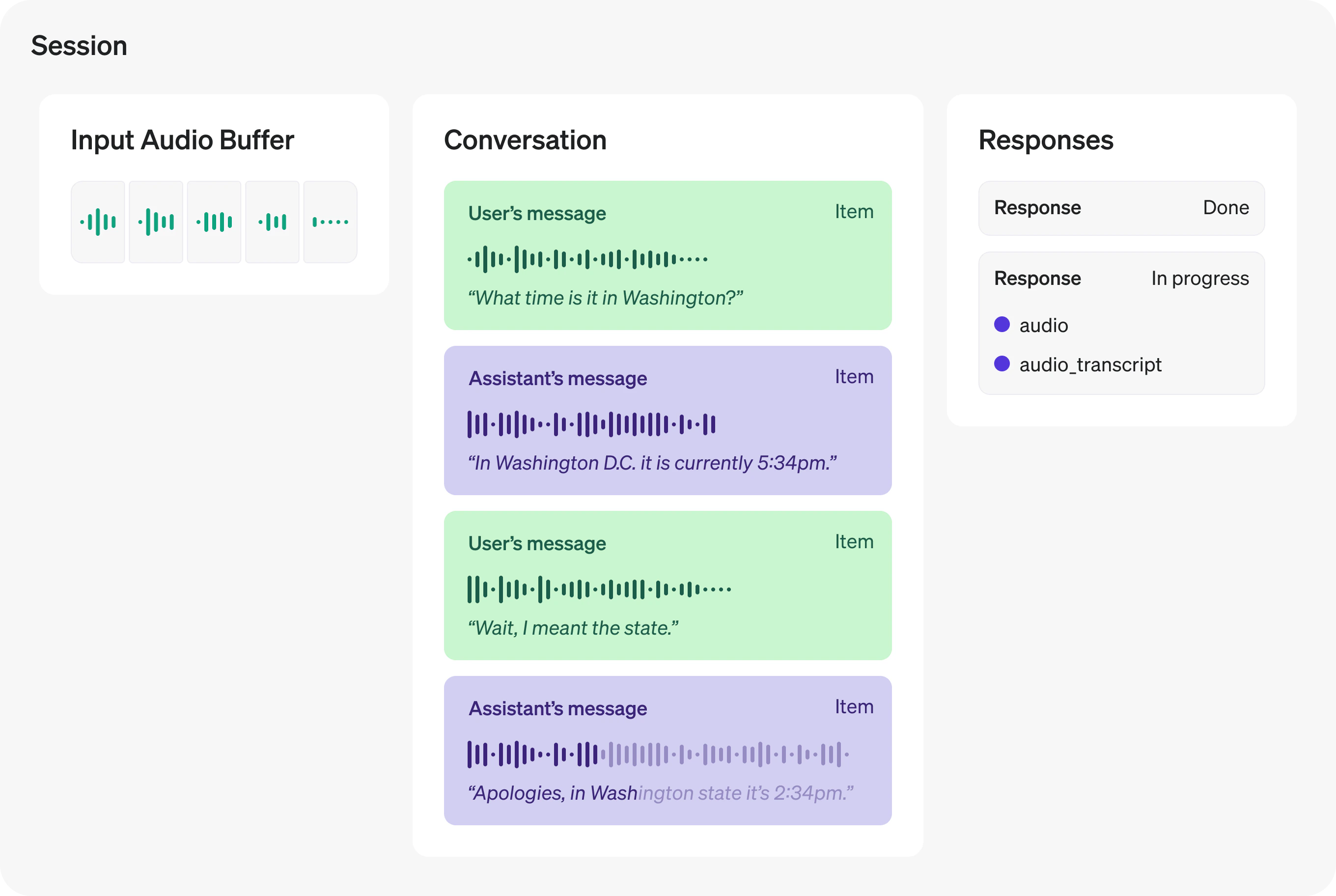
Real-time Session Components All these components together form a real-time session. You will use client events to update the session state and listen to server events to react to state changes in the session.

Event Flow Overview

  1. Connect WebSocket → Establish connection to wss://transfer.navtalk.ai/wss/v2/realtime-chat
  2. Send realtime.input_config → Send session configuration (voice, prompt, and optionally tools for OpenAI models) immediately in onopen handler
  3. Receive conversation.connected.success → Connection successful, contains sessionId and iceServers for WebRTC
  4. Receive realtime.session.created → Send conversation history
  5. Receive realtime.session.updated → Session ready, start sending audio input
Note: If connection errors occur (conversation.connected.fail, conversation.connected.close, conversation.connected.insufficient_balance, conversation.connected.gpu_full, conversation.connected.connection_limit_exceeded, conversation.connected.backend_error), handle them appropriately and inform the user.
Audio Input:
  1. User starts speaking → Receive realtime.input_audio_buffer.speech_started
    • Stop AI audio playback
    • Clear audio queue
  2. User continues speaking → Keep sending audio chunks (no events)
  3. User stops speaking → Receive realtime.input_audio_buffer.speech_stopped
  4. Transcription complete → Receive realtime.conversation.item.input_audio_transcription.completed
    • Display user message in chat (from data.content)
    • Save to conversation history
Camera Input (Optional):
  • Send image → Send realtime.input_image with camera snapshot
    • Set reply: 0 for context-building (no immediate response)
    • Set reply: 1 for visual Q&A (triggers AI response)
  • WebRTC video stream → Video tracks transmitted via WebRTC connection (Method 1)
  • Periodic snapshots → Images sent via WebSocket (Method 2)
Note: If user starts speaking while AI is responding, realtime.input_audio_buffer.speech_started will interrupt the AI response naturally.
  1. AI starts generating → Receive realtime.response.audio_transcript.delta (multiple times)
    • Accumulate text chunks by id (from data.id)
    • Get content from data.content
    • Render markdown in real-time
    • Start video playback
  2. Text complete → Receive realtime.response.audio_transcript.done
    • Save complete response to history (from data.content)
  3. Audio complete → Receive realtime.response.audio.done
    • Reset playback flags
Note: Use id from data.id to track multiple concurrent responses and accumulate content chunks to build the complete message.
  1. AI determines function needed → Receive realtime.response.function_call_arguments.done
    • Parse arguments (JSON string) and call_id from data
  2. Execute function → Call external API or execute business logic
  3. Send result → Send conversation.item.create with function_call_output
  4. Request AI response → Send response.create
  5. AI processes result → Receive normal response events (realtime.response.audio_transcript.delta, etc.)
Note: Always send response.create after sending the function call output to trigger AI processing.
A typical conversation cycle:
Connect WebSocket

conversation.connected.success → Get sessionId and iceServers

realtime.session.created → Send conversation history

realtime.session.updated → Start recording

User speaks → realtime.input_audio_buffer.speech_started → realtime.input_audio_buffer.speech_stopped

realtime.conversation.item.input_audio_transcription.completed → Display user message

realtime.response.audio_transcript.delta (streaming) → Display AI response

realtime.response.audio_transcript.done → Save to history

realtime.response.audio.done → Ready for next interaction
With Function Call:
[Same flow until AI determines function needed]

realtime.response.function_call_arguments.done → Execute function

Send function_call_output → Send response.create

[Continue with normal response flow]
With WebRTC Signaling:
conversation.connected.success → Get iceServers

webrtc.signaling.offer → Handle offer, create answer

webrtc.signaling.answer → Set remote description

webrtc.signaling.iceCandidate → Add ICE candidates

Event Type Constants

All event types are encapsulated using constants. Define them at the beginning of your code:
const NavTalkMessageType = Object.freeze({
    CONNECTED_SUCCESS: "conversation.connected.success",
    CONNECTED_FAIL: "conversation.connected.fail",
    CONNECTED_CLOSE: "conversation.connected.close",
    INSUFFICIENT_BALANCE: "conversation.connected.insufficient_balance",
    CONNECTED_GPU_FULL: "conversation.connected.gpu_full",
    CONNECTED_CONNECTION_LIMIT_EXCEEDED: "conversation.connected.connection_limit_exceeded",
    CONNECTED_BACKEND_ERROR: "conversation.connected.backend_error",
    WEB_RTC_OFFER: "webrtc.signaling.offer",
    WEB_RTC_ANSWER: "webrtc.signaling.answer",
    WEB_RTC_ICE_CANDIDATE: "webrtc.signaling.iceCandidate",
    REALTIME_SESSION_CREATED: "realtime.session.created",
    REALTIME_SESSION_UPDATED: "realtime.session.updated",
    REALTIME_SPEECH_STARTED: "realtime.input_audio_buffer.speech_started",
    REALTIME_SPEECH_STOPPED: "realtime.input_audio_buffer.speech_stopped",
    REALTIME_CONVERSATION_ITEM_COMPLETED: "realtime.conversation.item.input_audio_transcription.completed",
    REALTIME_RESPONSE_AUDIO_TRANSCRIPT_DELTA: "realtime.response.audio_transcript.delta",
    REALTIME_RESPONSE_AUDIO_DELTA: "realtime.response.audio.delta",
    REALTIME_RESPONSE_AUDIO_TRANSCRIPT_DONE: "realtime.response.audio_transcript.done",
    REALTIME_RESPONSE_AUDIO_DONE: "realtime.response.audio.done",
    REALTIME_RESPONSE_FUNCTION_CALL_ARGUMENTS_DONE: "realtime.response.function_call_arguments.done",
    REALTIME_INPUT_AUDIO_BUFFER_APPEND: "realtime.input_audio_buffer.append",
    REALTIME_INPUT_TEXT: "realtime.input_text",
    REALTIME_INPUT_IMAGE: "realtime.input_image",  // Send camera images for visual recognition
    REALTIME_INPUT_CONFIG: "realtime.input_config",  // Send session configuration
    UNKNOWN_TYPE: "unknow"
});

Basic Event Handler

Here’s a basic structure for handling WebSocket events:
// Send session configuration when connection opens
socket.onopen = () => {
  console.log('WebSocket connection established');
  
  const config = {
    voice: 'cedar',
    prompt: 'You are a helpful assistant.',
    tools: []  // Optional: Function calling tools (OpenAI models only)
  };
  
  socket.send(JSON.stringify({
    type: NavTalkMessageType.REALTIME_INPUT_CONFIG,
    data: { content: JSON.stringify(config) }
  }));
};

socket.onmessage = async (event) => {
  if (typeof event.data === 'string') {
    try {
      const data = JSON.parse(event.data);
      await handleReceivedMessage(data);
    } catch (e) {
      console.error("Failed to parse JSON message:", e);
    }
  }
};

async function handleReceivedMessage(data) {
  // Extract data: event data is encapsulated in data.data
  const nav_data = data.data;
  
  switch (data.type) {
    // Connection Events
    case NavTalkMessageType.CONNECTED_SUCCESS:
      const sessionId = nav_data.sessionId;
      const iceServers = nav_data.iceServers;
      // Configure WebRTC with iceServers
      break;
    case NavTalkMessageType.CONNECTED_FAIL:
    case NavTalkMessageType.CONNECTED_CLOSE:
      const errorMessage = data.message || "Unknown error";
      showError(errorMessage);
      break;
    
    // Session Events
    case NavTalkMessageType.REALTIME_SESSION_CREATED:
      await sendSessionUpdate(); // Send conversation history
      break;
    case NavTalkMessageType.REALTIME_SESSION_UPDATED:
      startRecording();
      break;
    
    // WebRTC Signaling Events
    case NavTalkMessageType.WEB_RTC_OFFER:
      handleOffer(nav_data.sdp);
      break;
    case NavTalkMessageType.WEB_RTC_ANSWER:
      handleAnswer(nav_data.sdp);
      break;
    case NavTalkMessageType.WEB_RTC_ICE_CANDIDATE:
      handleIceCandidate(nav_data.candidate);
      break;
    
    // Input Events
    case NavTalkMessageType.REALTIME_SPEECH_STARTED:
      stopCurrentAudioPlayback();
      break;
    case NavTalkMessageType.REALTIME_SPEECH_STOPPED:
      // Wait for transcription
      break;
    case NavTalkMessageType.REALTIME_CONVERSATION_ITEM_COMPLETED:
      displayUserMessage(nav_data.content);
      break;
    
    // Response Events
    case NavTalkMessageType.REALTIME_RESPONSE_AUDIO_TRANSCRIPT_DELTA:
      handleResponseDelta(nav_data.content, nav_data.id);
      break;
    case NavTalkMessageType.REALTIME_RESPONSE_AUDIO_TRANSCRIPT_DONE:
      await appendChatHistory("assistant", nav_data.content);
      break;
    case NavTalkMessageType.REALTIME_RESPONSE_AUDIO_DELTA:
      if (nav_data.delta) {
        // Process audio chunk
        processAudioChunk(nav_data.delta);
      }
      break;
    case NavTalkMessageType.REALTIME_RESPONSE_AUDIO_DONE:
      isPlaying = false;
      break;
    
    // Function Call Events
    case NavTalkMessageType.REALTIME_RESPONSE_FUNCTION_CALL_ARGUMENTS_DONE:
      await handleFunctionCall(nav_data);
      break;
    
    // Error Events (part of Connection Events)
    case NavTalkMessageType.CONNECTED_GPU_FULL:
    case NavTalkMessageType.CONNECTED_CONNECTION_LIMIT_EXCEEDED:
    case NavTalkMessageType.CONNECTED_BACKEND_ERROR:
    case NavTalkMessageType.INSUFFICIENT_BALANCE:
      showError(data.message || "An error occurred");
      break;
    
    default:
      console.warn("Unhandled event type: " + data.type);
  }
}
For detailed information about each event type, click on the event category cards above or navigate to the specific event documentation pages.

Important Notes

Message Data Structure: All event data is encapsulated in the data.data field. Always use data.data to access event properties, not the root-level data object.
// ✅ Correct way
const nav_data = data.data;
const sessionId = nav_data.sessionId;
const content = nav_data.content;

// ❌ Incorrect way
const sessionId = data.sessionId;  // This will be undefined
const content = data.content;      // This will also be undefined
Best Practices:
  1. Use Event Type Constants: Always use NavTalkMessageType constants instead of raw strings to avoid typos and make code more maintainable.
  2. Send Configuration First: Always send realtime.input_config immediately after the WebSocket connection opens (in the onopen handler) before processing any other events:
    socket.onopen = () => {
      const config = { 
        voice: 'cedar', 
        prompt: 'You are a helpful assistant.',
        tools: []  // Optional: Function calling tools (OpenAI models only)
      };
      socket.send(JSON.stringify({
        type: NavTalkMessageType.REALTIME_INPUT_CONFIG,
        data: { content: JSON.stringify(config) }
      }));
    };
    
  3. Audio Data Format: When sending audio data, always encapsulate it in the data.audio field:
    socket.send(JSON.stringify({ 
        type: NavTalkMessageType.REALTIME_INPUT_AUDIO_BUFFER_APPEND, 
        data: { audio: chunk }  // Note: audio is inside data field
    }));
    
  4. Error Handling: Always implement handlers for connection error events (CONNECTED_FAIL, CONNECTED_CLOSE, INSUFFICIENT_BALANCE, etc.) to provide proper error feedback to users.
  5. Event Data Consistency: Some events may have data directly in nav_data, while others may have nested structures. Always check the specific event documentation for the exact data format.