> ## Documentation Index
> Fetch the complete documentation index at: https://docs.navtalk.ai/llms.txt
> Use this file to discover all available pages before exploring further.
# Overview
> Overview of all WebSocket message events in real-time digital human conversations
When you establish a WebSocket connection with NavTalk, the server sends various event messages throughout the conversation lifecycle. This page provides an overview of all available event types and their flow.
## Event Categories
WebSocket events are categorized into seven main types:
WebSocket connection lifecycle events (3 events)
Session lifecycle events (2 events)
WebRTC signaling exchange (3 events)
User speech detection, transcription, and image input (4 events)
AI response generation and streaming (4 events)
External function execution
Error notifications and status alerts (4 events)
## Real-time Session
A real-time session is a stateful interaction between the model and the connected client. The key components of a session are:
* **Session Object**: Controls the parameters of the interaction, such as the model being used, the voice used to generate output, and other configurations.
* **Conversation**: Represents user input items and model output items generated during the current session.
* **Response**: Audio or text items generated by the model that are added to the conversation.
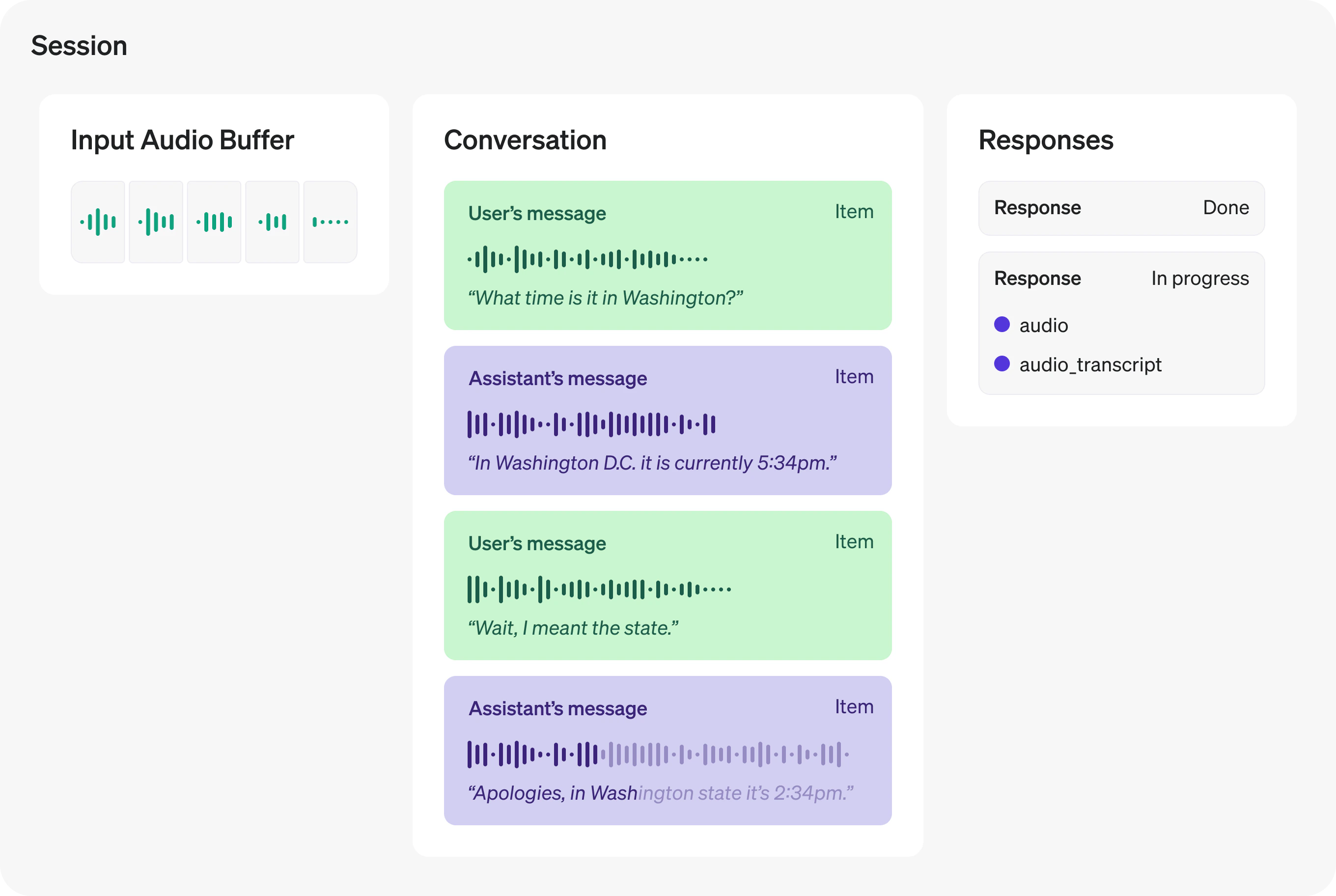 All these components together form a real-time session. You will use client events to update the session state and listen to server events to react to state changes in the session.
## Event Flow Overview
1. **Connect WebSocket** → Establish connection to `wss://transfer.navtalk.ai/wss/v2/realtime-chat`
2. **Send `realtime.input_config`** → Send session configuration (voice, prompt, and optionally tools for OpenAI models) immediately in `onopen` handler
3. **Receive `conversation.connected.success`** → Connection successful, contains `sessionId` for tracking and `iceServers` for WebRTC
4. **Receive `realtime.session.created`** → Send conversation history
5. **Receive `realtime.session.updated`** → Session ready, start sending audio input
**Note**: If connection errors occur (`conversation.connected.fail`, `conversation.connected.close`, `conversation.connected.insufficient_balance`, `conversation.connected.gpu_full`, `conversation.connected.connection_limit_exceeded`, `conversation.connected.backend_error`), handle them appropriately and inform the user.
**Audio Input:**
1. **User starts speaking** → Receive `realtime.input_audio_buffer.speech_started`
* Stop AI audio playback
* Clear audio queue
2. **User continues speaking** → Keep sending audio chunks (no events)
3. **User stops speaking** → Receive `realtime.input_audio_buffer.speech_stopped`
4. **Transcription complete** → Receive `realtime.conversation.item.input_audio_transcription.completed`
* Display user message in chat (from `data.content`)
* Save to conversation history
**Camera Input (Optional):**
* **Send image** → Send `realtime.input_image` with camera snapshot
* Set `reply: 0` for context-building (no immediate response)
* Set `reply: 1` for visual Q\&A (triggers AI response)
* **WebRTC video stream** → Video tracks transmitted via WebRTC connection (Method 1)
* **Periodic snapshots** → Images sent via WebSocket (Method 2)
**Note**: If user starts speaking while AI is responding, `realtime.input_audio_buffer.speech_started` will interrupt the AI response naturally.
1. **AI starts generating** → Receive `realtime.response.audio_transcript.delta` (multiple times)
* Accumulate text chunks by `id` (from `data.id`)
* Get content from `data.content`
* Render markdown in real-time
* Start video playback
2. **Text complete** → Receive `realtime.response.audio_transcript.done`
* Save complete response to history (from `data.content`)
3. **Audio complete** → Receive `realtime.response.audio.done`
* Reset playback flags
**Note**: Use `id` from `data.id` to track multiple concurrent responses and accumulate content chunks to build the complete message.
1. **AI determines function needed** → Receive `realtime.response.function_call_arguments.done`
* Parse `arguments` (JSON string) and `call_id` from `data`
2. **Execute function** → Call external API or execute business logic
3. **Optionally send result** → If the AI should continue based on the function result, send `realtime.function_call_output` with `data.content`, `data.call_id`, and `data.reply: "1"`
4. **AI processes result** → Receive normal response events (`realtime.response.audio_transcript.delta`, etc.)
**Note**: If the function call only triggers external business logic and no follow-up AI reply is needed, you can skip `realtime.function_call_output`.
A typical conversation cycle:
```
Connect WebSocket
↓
conversation.connected.success → Get sessionId for tracking and iceServers for WebRTC
↓
realtime.session.created → Send conversation history
↓
realtime.session.updated → Start recording
↓
User speaks → realtime.input_audio_buffer.speech_started → realtime.input_audio_buffer.speech_stopped
↓
realtime.conversation.item.input_audio_transcription.completed → Display user message
↓
realtime.response.audio_transcript.delta (streaming) → Display AI response
↓
realtime.response.audio_transcript.done → Save to history
↓
realtime.response.audio.done → Ready for next interaction
```
**With Function Call:**
```
[Same flow until AI determines function needed]
↓
realtime.response.function_call_arguments.done → Execute function
↓
Optional: Send realtime.function_call_output with reply: "1"
↓
[Continue with normal response flow]
```
**With WebRTC Signaling:**
```
conversation.connected.success → Get iceServers
↓
webrtc.signaling.offer → Handle offer, create answer
↓
webrtc.signaling.answer → Set remote description
↓
webrtc.signaling.iceCandidate → Add ICE candidates
```
## Event Type Constants
All event types are encapsulated using constants. Define them at the beginning of your code:
```javascript theme={null}
const NavTalkMessageType = Object.freeze({
CONNECTED_SUCCESS: "conversation.connected.success",
CONNECTED_FAIL: "conversation.connected.fail",
CONNECTED_CLOSE: "conversation.connected.close",
INSUFFICIENT_BALANCE: "conversation.connected.insufficient_balance",
CONNECTED_GPU_FULL: "conversation.connected.gpu_full",
CONNECTED_CONNECTION_LIMIT_EXCEEDED: "conversation.connected.connection_limit_exceeded",
CONNECTED_BACKEND_ERROR: "conversation.connected.backend_error",
WEB_RTC_OFFER: "webrtc.signaling.offer",
WEB_RTC_ANSWER: "webrtc.signaling.answer",
WEB_RTC_ICE_CANDIDATE: "webrtc.signaling.iceCandidate",
REALTIME_SESSION_CREATED: "realtime.session.created",
REALTIME_SESSION_UPDATED: "realtime.session.updated",
REALTIME_SPEECH_STARTED: "realtime.input_audio_buffer.speech_started",
REALTIME_SPEECH_STOPPED: "realtime.input_audio_buffer.speech_stopped",
REALTIME_CONVERSATION_ITEM_COMPLETED: "realtime.conversation.item.input_audio_transcription.completed",
REALTIME_RESPONSE_AUDIO_TRANSCRIPT_DELTA: "realtime.response.audio_transcript.delta",
REALTIME_RESPONSE_AUDIO_DELTA: "realtime.response.audio.delta",
REALTIME_RESPONSE_AUDIO_TRANSCRIPT_DONE: "realtime.response.audio_transcript.done",
REALTIME_RESPONSE_AUDIO_DONE: "realtime.response.audio.done",
REALTIME_RESPONSE_FUNCTION_CALL_ARGUMENTS_DONE: "realtime.response.function_call_arguments.done",
REALTIME_INPUT_AUDIO_BUFFER_APPEND: "realtime.input_audio_buffer.append",
REALTIME_INPUT_TEXT: "realtime.input_text",
REALTIME_INPUT_IMAGE: "realtime.input_image", // Send camera images for visual recognition
REALTIME_INPUT_CONFIG: "realtime.input_config", // Send session configuration
UNKNOWN_TYPE: "unknow"
});
```
## Basic Event Handler
Here's a basic structure for handling WebSocket events:
```javascript JavaScript theme={null}
// Send session configuration when connection opens
socket.onopen = () => {
console.log('WebSocket connection established');
const config = {
voice: 'cedar',
prompt: 'You are a helpful assistant.',
tools: [] // Optional: Function calling tools (OpenAI models only)
};
socket.send(JSON.stringify({
type: NavTalkMessageType.REALTIME_INPUT_CONFIG,
data: { content: JSON.stringify(config) }
}));
};
socket.onmessage = async (event) => {
if (typeof event.data === 'string') {
try {
const data = JSON.parse(event.data);
await handleReceivedMessage(data);
} catch (e) {
console.error("Failed to parse JSON message:", e);
}
}
};
async function handleReceivedMessage(data) {
// Extract data: event data is encapsulated in data.data
const nav_data = data.data;
switch (data.type) {
// Connection Events
case NavTalkMessageType.CONNECTED_SUCCESS:
const sessionId = nav_data.sessionId;
const iceServers = nav_data.iceServers;
// Configure WebRTC with iceServers
break;
case NavTalkMessageType.CONNECTED_FAIL:
case NavTalkMessageType.CONNECTED_CLOSE:
const errorMessage = data.message || "Unknown error";
showError(errorMessage);
break;
// Session Events
case NavTalkMessageType.REALTIME_SESSION_CREATED:
await sendSessionUpdate(); // Send conversation history
break;
case NavTalkMessageType.REALTIME_SESSION_UPDATED:
startRecording();
break;
// WebRTC Signaling Events
case NavTalkMessageType.WEB_RTC_OFFER:
handleOffer(nav_data.sdp);
break;
case NavTalkMessageType.WEB_RTC_ANSWER:
handleAnswer(nav_data.sdp);
break;
case NavTalkMessageType.WEB_RTC_ICE_CANDIDATE:
handleIceCandidate(nav_data.candidate);
break;
// Input Events
case NavTalkMessageType.REALTIME_SPEECH_STARTED:
stopCurrentAudioPlayback();
break;
case NavTalkMessageType.REALTIME_SPEECH_STOPPED:
// Wait for transcription
break;
case NavTalkMessageType.REALTIME_CONVERSATION_ITEM_COMPLETED:
displayUserMessage(nav_data.content);
break;
// Response Events
case NavTalkMessageType.REALTIME_RESPONSE_AUDIO_TRANSCRIPT_DELTA:
handleResponseDelta(nav_data.content, nav_data.id);
break;
case NavTalkMessageType.REALTIME_RESPONSE_AUDIO_TRANSCRIPT_DONE:
await appendChatHistory("assistant", nav_data.content);
break;
case NavTalkMessageType.REALTIME_RESPONSE_AUDIO_DELTA:
if (nav_data.delta) {
// Process audio chunk
processAudioChunk(nav_data.delta);
}
break;
case NavTalkMessageType.REALTIME_RESPONSE_AUDIO_DONE:
isPlaying = false;
break;
// Function Call Events
case NavTalkMessageType.REALTIME_RESPONSE_FUNCTION_CALL_ARGUMENTS_DONE:
await handleFunctionCall(nav_data);
break;
// Error Events (part of Connection Events)
case NavTalkMessageType.CONNECTED_GPU_FULL:
case NavTalkMessageType.CONNECTED_CONNECTION_LIMIT_EXCEEDED:
case NavTalkMessageType.CONNECTED_BACKEND_ERROR:
case NavTalkMessageType.INSUFFICIENT_BALANCE:
showError(data.message || "An error occurred");
break;
default:
console.warn("Unhandled event type: " + data.type);
}
}
```
```python Python theme={null}
# Event type constants
NAV_TALK_MESSAGE_TYPE = {
'CONNECTED_SUCCESS': 'conversation.connected.success',
'CONNECTED_FAIL': 'conversation.connected.fail',
'CONNECTED_CLOSE': 'conversation.connected.close',
'INSUFFICIENT_BALANCE': 'conversation.connected.insufficient_balance',
'CONNECTED_GPU_FULL': 'conversation.connected.gpu_full',
'CONNECTED_CONNECTION_LIMIT_EXCEEDED': 'conversation.connected.connection_limit_exceeded',
'CONNECTED_BACKEND_ERROR': 'conversation.connected.backend_error',
'WEB_RTC_OFFER': 'webrtc.signaling.offer',
'WEB_RTC_ANSWER': 'webrtc.signaling.answer',
'WEB_RTC_ICE_CANDIDATE': 'webrtc.signaling.iceCandidate',
'REALTIME_SESSION_CREATED': 'realtime.session.created',
'REALTIME_SESSION_UPDATED': 'realtime.session.updated',
'REALTIME_SPEECH_STARTED': 'realtime.input_audio_buffer.speech_started',
'REALTIME_SPEECH_STOPPED': 'realtime.input_audio_buffer.speech_stopped',
'REALTIME_CONVERSATION_ITEM_COMPLETED': 'realtime.conversation.item.input_audio_transcription.completed',
'REALTIME_RESPONSE_AUDIO_TRANSCRIPT_DELTA': 'realtime.response.audio_transcript.delta',
'REALTIME_RESPONSE_AUDIO_TRANSCRIPT_DONE': 'realtime.response.audio_transcript.done',
'REALTIME_RESPONSE_AUDIO_DELTA': 'realtime.response.audio.delta',
'REALTIME_RESPONSE_AUDIO_DONE': 'realtime.response.audio.done',
'REALTIME_RESPONSE_FUNCTION_CALL_ARGUMENTS_DONE': 'realtime.response.function_call_arguments.done',
}
async def handle_messages(websocket):
async for message in websocket:
if isinstance(message, str):
try:
data = json.loads(message)
await handle_received_message(data, websocket)
except Exception as e:
print(f"Failed to parse JSON message: {e}")
async def handle_received_message(data, websocket):
event_type = data.get('type')
nav_data = data.get('data') # Extract data from data.data field
# Connection Events
if event_type == NAV_TALK_MESSAGE_TYPE['CONNECTED_SUCCESS']:
session_id = nav_data.get('sessionId')
ice_servers = nav_data.get('iceServers')
# Configure WebRTC with ice_servers
elif event_type in [NAV_TALK_MESSAGE_TYPE['CONNECTED_FAIL'],
NAV_TALK_MESSAGE_TYPE['CONNECTED_CLOSE']]:
error_message = data.get('message', 'Unknown error')
show_error(error_message)
# Session Events
elif event_type == NAV_TALK_MESSAGE_TYPE['REALTIME_SESSION_CREATED']:
await send_session_update(websocket) # Send conversation history
elif event_type == NAV_TALK_MESSAGE_TYPE['REALTIME_SESSION_UPDATED']:
start_recording()
# WebRTC Signaling Events
elif event_type == NAV_TALK_MESSAGE_TYPE['WEB_RTC_OFFER']:
handle_offer(nav_data.get('sdp'))
elif event_type == NAV_TALK_MESSAGE_TYPE['WEB_RTC_ANSWER']:
handle_answer(nav_data.get('sdp'))
elif event_type == NAV_TALK_MESSAGE_TYPE['WEB_RTC_ICE_CANDIDATE']:
handle_ice_candidate(nav_data.get('candidate'))
# Input Events
elif event_type == NAV_TALK_MESSAGE_TYPE['REALTIME_SPEECH_STARTED']:
stop_current_audio_playback()
elif event_type == NAV_TALK_MESSAGE_TYPE['REALTIME_SPEECH_STOPPED']:
pass # Wait for transcription
elif event_type == NAV_TALK_MESSAGE_TYPE['REALTIME_CONVERSATION_ITEM_COMPLETED']:
display_user_message(nav_data.get('content'))
# Response Events
elif event_type == NAV_TALK_MESSAGE_TYPE['REALTIME_RESPONSE_AUDIO_TRANSCRIPT_DELTA']:
await handle_response_delta(nav_data.get('content'), nav_data.get('id'))
elif event_type == NAV_TALK_MESSAGE_TYPE['REALTIME_RESPONSE_AUDIO_TRANSCRIPT_DONE']:
await append_chat_history("assistant", nav_data.get('content'))
elif event_type == NAV_TALK_MESSAGE_TYPE['REALTIME_RESPONSE_AUDIO_DELTA']:
if nav_data.get('delta'):
# Process audio chunk
process_audio_chunk(nav_data.get('delta'))
elif event_type == NAV_TALK_MESSAGE_TYPE['REALTIME_RESPONSE_AUDIO_DONE']:
is_playing = False
# Function Call Events
elif event_type == NAV_TALK_MESSAGE_TYPE['REALTIME_RESPONSE_FUNCTION_CALL_ARGUMENTS_DONE']:
await handle_function_call(nav_data, websocket)
# Error Events (part of Connection Events)
elif event_type in [NAV_TALK_MESSAGE_TYPE['CONNECTED_GPU_FULL'],
NAV_TALK_MESSAGE_TYPE['CONNECTED_CONNECTION_LIMIT_EXCEEDED'],
NAV_TALK_MESSAGE_TYPE['CONNECTED_BACKEND_ERROR'],
NAV_TALK_MESSAGE_TYPE['INSUFFICIENT_BALANCE']]:
show_error(data.get('message', 'An error occurred'))
else:
print(f"Unhandled event type: {event_type}")
```
For detailed information about each event type, click on the event category cards above or navigate to the specific event documentation pages.
## Important Notes
**Message Data Structure**: All event data is encapsulated in the `data.data` field. Always use `data.data` to access event properties, not the root-level `data` object.
```javascript theme={null}
// ✅ Correct way
const nav_data = data.data;
const sessionId = nav_data.sessionId;
const content = nav_data.content;
// ❌ Incorrect way
const sessionId = data.sessionId; // This will be undefined
const content = data.content; // This will also be undefined
```
**Best Practices**:
1. **Use Event Type Constants**: Always use `NavTalkMessageType` constants instead of raw strings to avoid typos and make code more maintainable.
2. **Send Configuration First**: Always send `realtime.input_config` immediately after the WebSocket connection opens (in the `onopen` handler) before processing any other events:
```javascript theme={null}
socket.onopen = () => {
const config = {
voice: 'cedar',
prompt: 'You are a helpful assistant.',
tools: [] // Optional: Function calling tools (OpenAI models only)
};
socket.send(JSON.stringify({
type: NavTalkMessageType.REALTIME_INPUT_CONFIG,
data: { content: JSON.stringify(config) }
}));
};
```
3. **Audio Data Format**: When sending audio data, always encapsulate it in the `data.audio` field:
```javascript theme={null}
socket.send(JSON.stringify({
type: NavTalkMessageType.REALTIME_INPUT_AUDIO_BUFFER_APPEND,
data: { audio: chunk } // Note: audio is inside data field
}));
```
4. **Error Handling**: Always implement handlers for connection error events (`CONNECTED_FAIL`, `CONNECTED_CLOSE`, `INSUFFICIENT_BALANCE`, etc.) to provide proper error feedback to users.
5. **Event Data Consistency**: Some events may have data directly in `nav_data`, while others may have nested structures. Always check the specific event documentation for the exact data format.
All these components together form a real-time session. You will use client events to update the session state and listen to server events to react to state changes in the session.
## Event Flow Overview
1. **Connect WebSocket** → Establish connection to `wss://transfer.navtalk.ai/wss/v2/realtime-chat`
2. **Send `realtime.input_config`** → Send session configuration (voice, prompt, and optionally tools for OpenAI models) immediately in `onopen` handler
3. **Receive `conversation.connected.success`** → Connection successful, contains `sessionId` for tracking and `iceServers` for WebRTC
4. **Receive `realtime.session.created`** → Send conversation history
5. **Receive `realtime.session.updated`** → Session ready, start sending audio input
**Note**: If connection errors occur (`conversation.connected.fail`, `conversation.connected.close`, `conversation.connected.insufficient_balance`, `conversation.connected.gpu_full`, `conversation.connected.connection_limit_exceeded`, `conversation.connected.backend_error`), handle them appropriately and inform the user.
**Audio Input:**
1. **User starts speaking** → Receive `realtime.input_audio_buffer.speech_started`
* Stop AI audio playback
* Clear audio queue
2. **User continues speaking** → Keep sending audio chunks (no events)
3. **User stops speaking** → Receive `realtime.input_audio_buffer.speech_stopped`
4. **Transcription complete** → Receive `realtime.conversation.item.input_audio_transcription.completed`
* Display user message in chat (from `data.content`)
* Save to conversation history
**Camera Input (Optional):**
* **Send image** → Send `realtime.input_image` with camera snapshot
* Set `reply: 0` for context-building (no immediate response)
* Set `reply: 1` for visual Q\&A (triggers AI response)
* **WebRTC video stream** → Video tracks transmitted via WebRTC connection (Method 1)
* **Periodic snapshots** → Images sent via WebSocket (Method 2)
**Note**: If user starts speaking while AI is responding, `realtime.input_audio_buffer.speech_started` will interrupt the AI response naturally.
1. **AI starts generating** → Receive `realtime.response.audio_transcript.delta` (multiple times)
* Accumulate text chunks by `id` (from `data.id`)
* Get content from `data.content`
* Render markdown in real-time
* Start video playback
2. **Text complete** → Receive `realtime.response.audio_transcript.done`
* Save complete response to history (from `data.content`)
3. **Audio complete** → Receive `realtime.response.audio.done`
* Reset playback flags
**Note**: Use `id` from `data.id` to track multiple concurrent responses and accumulate content chunks to build the complete message.
1. **AI determines function needed** → Receive `realtime.response.function_call_arguments.done`
* Parse `arguments` (JSON string) and `call_id` from `data`
2. **Execute function** → Call external API or execute business logic
3. **Optionally send result** → If the AI should continue based on the function result, send `realtime.function_call_output` with `data.content`, `data.call_id`, and `data.reply: "1"`
4. **AI processes result** → Receive normal response events (`realtime.response.audio_transcript.delta`, etc.)
**Note**: If the function call only triggers external business logic and no follow-up AI reply is needed, you can skip `realtime.function_call_output`.
A typical conversation cycle:
```
Connect WebSocket
↓
conversation.connected.success → Get sessionId for tracking and iceServers for WebRTC
↓
realtime.session.created → Send conversation history
↓
realtime.session.updated → Start recording
↓
User speaks → realtime.input_audio_buffer.speech_started → realtime.input_audio_buffer.speech_stopped
↓
realtime.conversation.item.input_audio_transcription.completed → Display user message
↓
realtime.response.audio_transcript.delta (streaming) → Display AI response
↓
realtime.response.audio_transcript.done → Save to history
↓
realtime.response.audio.done → Ready for next interaction
```
**With Function Call:**
```
[Same flow until AI determines function needed]
↓
realtime.response.function_call_arguments.done → Execute function
↓
Optional: Send realtime.function_call_output with reply: "1"
↓
[Continue with normal response flow]
```
**With WebRTC Signaling:**
```
conversation.connected.success → Get iceServers
↓
webrtc.signaling.offer → Handle offer, create answer
↓
webrtc.signaling.answer → Set remote description
↓
webrtc.signaling.iceCandidate → Add ICE candidates
```
## Event Type Constants
All event types are encapsulated using constants. Define them at the beginning of your code:
```javascript theme={null}
const NavTalkMessageType = Object.freeze({
CONNECTED_SUCCESS: "conversation.connected.success",
CONNECTED_FAIL: "conversation.connected.fail",
CONNECTED_CLOSE: "conversation.connected.close",
INSUFFICIENT_BALANCE: "conversation.connected.insufficient_balance",
CONNECTED_GPU_FULL: "conversation.connected.gpu_full",
CONNECTED_CONNECTION_LIMIT_EXCEEDED: "conversation.connected.connection_limit_exceeded",
CONNECTED_BACKEND_ERROR: "conversation.connected.backend_error",
WEB_RTC_OFFER: "webrtc.signaling.offer",
WEB_RTC_ANSWER: "webrtc.signaling.answer",
WEB_RTC_ICE_CANDIDATE: "webrtc.signaling.iceCandidate",
REALTIME_SESSION_CREATED: "realtime.session.created",
REALTIME_SESSION_UPDATED: "realtime.session.updated",
REALTIME_SPEECH_STARTED: "realtime.input_audio_buffer.speech_started",
REALTIME_SPEECH_STOPPED: "realtime.input_audio_buffer.speech_stopped",
REALTIME_CONVERSATION_ITEM_COMPLETED: "realtime.conversation.item.input_audio_transcription.completed",
REALTIME_RESPONSE_AUDIO_TRANSCRIPT_DELTA: "realtime.response.audio_transcript.delta",
REALTIME_RESPONSE_AUDIO_DELTA: "realtime.response.audio.delta",
REALTIME_RESPONSE_AUDIO_TRANSCRIPT_DONE: "realtime.response.audio_transcript.done",
REALTIME_RESPONSE_AUDIO_DONE: "realtime.response.audio.done",
REALTIME_RESPONSE_FUNCTION_CALL_ARGUMENTS_DONE: "realtime.response.function_call_arguments.done",
REALTIME_INPUT_AUDIO_BUFFER_APPEND: "realtime.input_audio_buffer.append",
REALTIME_INPUT_TEXT: "realtime.input_text",
REALTIME_INPUT_IMAGE: "realtime.input_image", // Send camera images for visual recognition
REALTIME_INPUT_CONFIG: "realtime.input_config", // Send session configuration
UNKNOWN_TYPE: "unknow"
});
```
## Basic Event Handler
Here's a basic structure for handling WebSocket events:
```javascript JavaScript theme={null}
// Send session configuration when connection opens
socket.onopen = () => {
console.log('WebSocket connection established');
const config = {
voice: 'cedar',
prompt: 'You are a helpful assistant.',
tools: [] // Optional: Function calling tools (OpenAI models only)
};
socket.send(JSON.stringify({
type: NavTalkMessageType.REALTIME_INPUT_CONFIG,
data: { content: JSON.stringify(config) }
}));
};
socket.onmessage = async (event) => {
if (typeof event.data === 'string') {
try {
const data = JSON.parse(event.data);
await handleReceivedMessage(data);
} catch (e) {
console.error("Failed to parse JSON message:", e);
}
}
};
async function handleReceivedMessage(data) {
// Extract data: event data is encapsulated in data.data
const nav_data = data.data;
switch (data.type) {
// Connection Events
case NavTalkMessageType.CONNECTED_SUCCESS:
const sessionId = nav_data.sessionId;
const iceServers = nav_data.iceServers;
// Configure WebRTC with iceServers
break;
case NavTalkMessageType.CONNECTED_FAIL:
case NavTalkMessageType.CONNECTED_CLOSE:
const errorMessage = data.message || "Unknown error";
showError(errorMessage);
break;
// Session Events
case NavTalkMessageType.REALTIME_SESSION_CREATED:
await sendSessionUpdate(); // Send conversation history
break;
case NavTalkMessageType.REALTIME_SESSION_UPDATED:
startRecording();
break;
// WebRTC Signaling Events
case NavTalkMessageType.WEB_RTC_OFFER:
handleOffer(nav_data.sdp);
break;
case NavTalkMessageType.WEB_RTC_ANSWER:
handleAnswer(nav_data.sdp);
break;
case NavTalkMessageType.WEB_RTC_ICE_CANDIDATE:
handleIceCandidate(nav_data.candidate);
break;
// Input Events
case NavTalkMessageType.REALTIME_SPEECH_STARTED:
stopCurrentAudioPlayback();
break;
case NavTalkMessageType.REALTIME_SPEECH_STOPPED:
// Wait for transcription
break;
case NavTalkMessageType.REALTIME_CONVERSATION_ITEM_COMPLETED:
displayUserMessage(nav_data.content);
break;
// Response Events
case NavTalkMessageType.REALTIME_RESPONSE_AUDIO_TRANSCRIPT_DELTA:
handleResponseDelta(nav_data.content, nav_data.id);
break;
case NavTalkMessageType.REALTIME_RESPONSE_AUDIO_TRANSCRIPT_DONE:
await appendChatHistory("assistant", nav_data.content);
break;
case NavTalkMessageType.REALTIME_RESPONSE_AUDIO_DELTA:
if (nav_data.delta) {
// Process audio chunk
processAudioChunk(nav_data.delta);
}
break;
case NavTalkMessageType.REALTIME_RESPONSE_AUDIO_DONE:
isPlaying = false;
break;
// Function Call Events
case NavTalkMessageType.REALTIME_RESPONSE_FUNCTION_CALL_ARGUMENTS_DONE:
await handleFunctionCall(nav_data);
break;
// Error Events (part of Connection Events)
case NavTalkMessageType.CONNECTED_GPU_FULL:
case NavTalkMessageType.CONNECTED_CONNECTION_LIMIT_EXCEEDED:
case NavTalkMessageType.CONNECTED_BACKEND_ERROR:
case NavTalkMessageType.INSUFFICIENT_BALANCE:
showError(data.message || "An error occurred");
break;
default:
console.warn("Unhandled event type: " + data.type);
}
}
```
```python Python theme={null}
# Event type constants
NAV_TALK_MESSAGE_TYPE = {
'CONNECTED_SUCCESS': 'conversation.connected.success',
'CONNECTED_FAIL': 'conversation.connected.fail',
'CONNECTED_CLOSE': 'conversation.connected.close',
'INSUFFICIENT_BALANCE': 'conversation.connected.insufficient_balance',
'CONNECTED_GPU_FULL': 'conversation.connected.gpu_full',
'CONNECTED_CONNECTION_LIMIT_EXCEEDED': 'conversation.connected.connection_limit_exceeded',
'CONNECTED_BACKEND_ERROR': 'conversation.connected.backend_error',
'WEB_RTC_OFFER': 'webrtc.signaling.offer',
'WEB_RTC_ANSWER': 'webrtc.signaling.answer',
'WEB_RTC_ICE_CANDIDATE': 'webrtc.signaling.iceCandidate',
'REALTIME_SESSION_CREATED': 'realtime.session.created',
'REALTIME_SESSION_UPDATED': 'realtime.session.updated',
'REALTIME_SPEECH_STARTED': 'realtime.input_audio_buffer.speech_started',
'REALTIME_SPEECH_STOPPED': 'realtime.input_audio_buffer.speech_stopped',
'REALTIME_CONVERSATION_ITEM_COMPLETED': 'realtime.conversation.item.input_audio_transcription.completed',
'REALTIME_RESPONSE_AUDIO_TRANSCRIPT_DELTA': 'realtime.response.audio_transcript.delta',
'REALTIME_RESPONSE_AUDIO_TRANSCRIPT_DONE': 'realtime.response.audio_transcript.done',
'REALTIME_RESPONSE_AUDIO_DELTA': 'realtime.response.audio.delta',
'REALTIME_RESPONSE_AUDIO_DONE': 'realtime.response.audio.done',
'REALTIME_RESPONSE_FUNCTION_CALL_ARGUMENTS_DONE': 'realtime.response.function_call_arguments.done',
}
async def handle_messages(websocket):
async for message in websocket:
if isinstance(message, str):
try:
data = json.loads(message)
await handle_received_message(data, websocket)
except Exception as e:
print(f"Failed to parse JSON message: {e}")
async def handle_received_message(data, websocket):
event_type = data.get('type')
nav_data = data.get('data') # Extract data from data.data field
# Connection Events
if event_type == NAV_TALK_MESSAGE_TYPE['CONNECTED_SUCCESS']:
session_id = nav_data.get('sessionId')
ice_servers = nav_data.get('iceServers')
# Configure WebRTC with ice_servers
elif event_type in [NAV_TALK_MESSAGE_TYPE['CONNECTED_FAIL'],
NAV_TALK_MESSAGE_TYPE['CONNECTED_CLOSE']]:
error_message = data.get('message', 'Unknown error')
show_error(error_message)
# Session Events
elif event_type == NAV_TALK_MESSAGE_TYPE['REALTIME_SESSION_CREATED']:
await send_session_update(websocket) # Send conversation history
elif event_type == NAV_TALK_MESSAGE_TYPE['REALTIME_SESSION_UPDATED']:
start_recording()
# WebRTC Signaling Events
elif event_type == NAV_TALK_MESSAGE_TYPE['WEB_RTC_OFFER']:
handle_offer(nav_data.get('sdp'))
elif event_type == NAV_TALK_MESSAGE_TYPE['WEB_RTC_ANSWER']:
handle_answer(nav_data.get('sdp'))
elif event_type == NAV_TALK_MESSAGE_TYPE['WEB_RTC_ICE_CANDIDATE']:
handle_ice_candidate(nav_data.get('candidate'))
# Input Events
elif event_type == NAV_TALK_MESSAGE_TYPE['REALTIME_SPEECH_STARTED']:
stop_current_audio_playback()
elif event_type == NAV_TALK_MESSAGE_TYPE['REALTIME_SPEECH_STOPPED']:
pass # Wait for transcription
elif event_type == NAV_TALK_MESSAGE_TYPE['REALTIME_CONVERSATION_ITEM_COMPLETED']:
display_user_message(nav_data.get('content'))
# Response Events
elif event_type == NAV_TALK_MESSAGE_TYPE['REALTIME_RESPONSE_AUDIO_TRANSCRIPT_DELTA']:
await handle_response_delta(nav_data.get('content'), nav_data.get('id'))
elif event_type == NAV_TALK_MESSAGE_TYPE['REALTIME_RESPONSE_AUDIO_TRANSCRIPT_DONE']:
await append_chat_history("assistant", nav_data.get('content'))
elif event_type == NAV_TALK_MESSAGE_TYPE['REALTIME_RESPONSE_AUDIO_DELTA']:
if nav_data.get('delta'):
# Process audio chunk
process_audio_chunk(nav_data.get('delta'))
elif event_type == NAV_TALK_MESSAGE_TYPE['REALTIME_RESPONSE_AUDIO_DONE']:
is_playing = False
# Function Call Events
elif event_type == NAV_TALK_MESSAGE_TYPE['REALTIME_RESPONSE_FUNCTION_CALL_ARGUMENTS_DONE']:
await handle_function_call(nav_data, websocket)
# Error Events (part of Connection Events)
elif event_type in [NAV_TALK_MESSAGE_TYPE['CONNECTED_GPU_FULL'],
NAV_TALK_MESSAGE_TYPE['CONNECTED_CONNECTION_LIMIT_EXCEEDED'],
NAV_TALK_MESSAGE_TYPE['CONNECTED_BACKEND_ERROR'],
NAV_TALK_MESSAGE_TYPE['INSUFFICIENT_BALANCE']]:
show_error(data.get('message', 'An error occurred'))
else:
print(f"Unhandled event type: {event_type}")
```
For detailed information about each event type, click on the event category cards above or navigate to the specific event documentation pages.
## Important Notes
**Message Data Structure**: All event data is encapsulated in the `data.data` field. Always use `data.data` to access event properties, not the root-level `data` object.
```javascript theme={null}
// ✅ Correct way
const nav_data = data.data;
const sessionId = nav_data.sessionId;
const content = nav_data.content;
// ❌ Incorrect way
const sessionId = data.sessionId; // This will be undefined
const content = data.content; // This will also be undefined
```
**Best Practices**:
1. **Use Event Type Constants**: Always use `NavTalkMessageType` constants instead of raw strings to avoid typos and make code more maintainable.
2. **Send Configuration First**: Always send `realtime.input_config` immediately after the WebSocket connection opens (in the `onopen` handler) before processing any other events:
```javascript theme={null}
socket.onopen = () => {
const config = {
voice: 'cedar',
prompt: 'You are a helpful assistant.',
tools: [] // Optional: Function calling tools (OpenAI models only)
};
socket.send(JSON.stringify({
type: NavTalkMessageType.REALTIME_INPUT_CONFIG,
data: { content: JSON.stringify(config) }
}));
};
```
3. **Audio Data Format**: When sending audio data, always encapsulate it in the `data.audio` field:
```javascript theme={null}
socket.send(JSON.stringify({
type: NavTalkMessageType.REALTIME_INPUT_AUDIO_BUFFER_APPEND,
data: { audio: chunk } // Note: audio is inside data field
}));
```
4. **Error Handling**: Always implement handlers for connection error events (`CONNECTED_FAIL`, `CONNECTED_CLOSE`, `INSUFFICIENT_BALANCE`, etc.) to provide proper error feedback to users.
5. **Event Data Consistency**: Some events may have data directly in `nav_data`, while others may have nested structures. Always check the specific event documentation for the exact data format.